This video tutorial has been acquired from Downloadtube.com
Review
With this program you can selectively adjust colors in your digital images. It combines sophisticated L*C*h* color processing with an easy-to-use interface. Simply click on the color to fix, then adjust lightness, saturation and hue of that color. This program works on Windows platform.
What's new in version 1.4
Professional photographers individually adjust the colors of each important item a photo. For example, they make sure that skin tones look just right, the sky is the right shade of blue, etc. These key colors have a critical effect on how good a photo looks. Unfortunately, the software for making these kinds of selective adjustments is usually costly, complicated, and takes significant time to master.
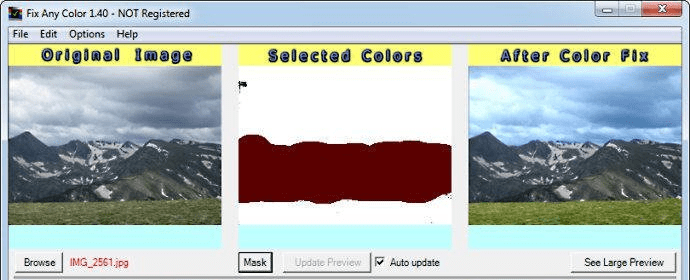
Fix Any Color uses "Fuzzy Logic" technology to make this selective color editing much easier. First, users click on the item in their digital photo that they want to change the color of. Then they adjust the item's color using simple Lightness, Saturation, and Hue color adjustment sliders. Views of the original and adjusted images are displayed side-by-side, so it is easy to see exactly what is being done to the photo. Behind the scenes, all color edits are performed using the professional "L*C*h*" color space to ensure smooth, top quality results.
This selective color editing gives users near total control over the colors of their images. It allows them to make the colors in their photos either match, or be better than, real world colors. The ease-of-use of Fix Any Color enables almost anyone to achieve professional quality results.
Fix Any Color is available for purchase from http://www.FixAnyColor.com. A trial version, demo video, and sample results are also available on the website.
SRS1 Software, LLC is a Newton, MA based software company that provides software and digital imaging products and services.